When you promote an event across multiple channels, it is useful to know where your registrations are coming from.
Did attendees find your event through LinkedIn? A paid campaign? An email newsletter? A partner website?
UTM parameters can help answer these questions by adding campaign information to the links you share. When your event registration is embedded into your own website using KonfHub, UTM integration helps carry that campaign information through to the registration or checkout journey.
This gives organizers a clearer picture of which campaigns and channels are driving registrations.
What is UTM tracking?
UTM (Urchin Tracking Module) parameters are small pieces of information added to a URL to identify the source of website traffic.
For example, an event organizer may promote the same event through:
LinkedIn
Email campaigns
Paid social media
Partner websites
Different marketing campaigns
Instead of simply knowing that someone visited the registration page, UTM tracking can help identify the campaign or channel that brought that visitor there.
This becomes particularly useful when you are running several promotional activities at the same time.
What information can be tracked?
KonfHub's UTM integration supports selected campaign attribution fields.
These generally help identify three things:
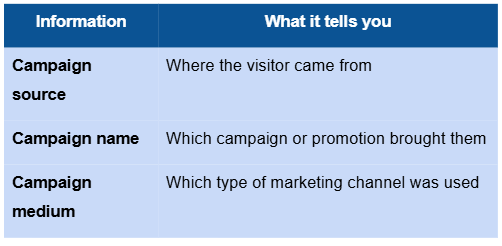
For example, an organizer could use these fields to distinguish between registrations generated through a LinkedIn campaign, an email campaign, or a paid marketing campaign.
The integration is intentionally limited to the supported UTM fields rather than assuming that every possible tracking parameter will be accepted.
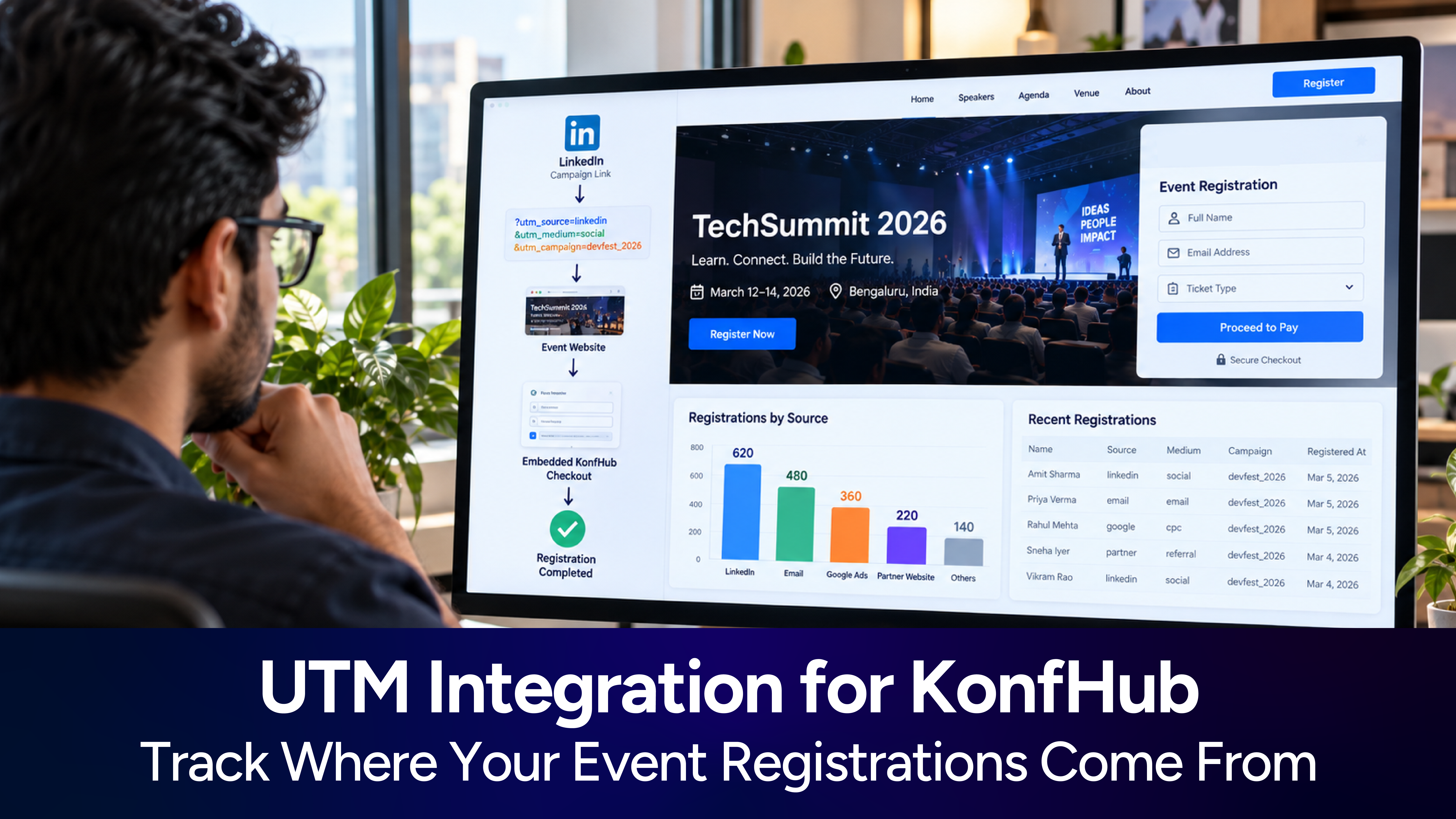
UTM parameters example in KonfHub
As mentioned in last section, the three core UTM parameters are:
utm_source — identifies where the traffic came from
Example: linkedin, google, newsletterutm_medium — identifies the marketing channel
Example: social, email, cpcutm_campaign — identifies the specific campaign
Example: devfest_2026, summer_sale
Example
Here:
Source: LinkedIn
Medium: Social
Campaign: DevFest Raipur 2026
When a registration happens using this URL, then along with the registration, these UTM parameter values will be stored, and is also available in the Attendee Downloads. Hence, you can track, reward referrers or and optimize your campaigns using such UTM parameters.
Why is UTM integration useful for event organizers?
Event promotion rarely happens through a single channel. An organizer might announce an event on social media, send multiple email campaigns, work with partners, and run paid advertisements.
Without campaign attribution, it can be difficult to understand which of these efforts are contributing to registrations.
With UTM integration, organizers can maintain campaign attribution when attendees move from the organizer's website to the embedded KonfHub registration or checkout experience.
This can help you:
Understand where registrations are coming from
Compare the performance of different campaigns
Identify channels that are generating attendee interest
Measure marketing efforts more effectively
Make better-informed decisions for future event promotions
How does UTM integration work with an embedded KonfHub checkout?
When the KonfHub checkout is embedded into an organizer's website, the registration experience runs inside an embedded checkout.
The campaign information is initially available on the organizer's webpage URL. The website then needs to pass the relevant campaign information to the embedded KonfHub checkout.
At a high level, the flow looks like this:
Campaign link → Organizer website → Embedded KonfHub checkout → Registration / purchase
The website captures the campaign information when the visitor arrives and carries it forward when the KonfHub checkout is loaded.
This is important because an embedded checkout cannot simply read the URL of the webpage containing it. The organizer's website needs to handle this handoff.
Where can UTM integration be used?
The approach can work with different types of websites and applications.
For example, an organizer may have:
A custom HTML website
A WordPress website
A React, Vue, Angular, or similar application
A server-rendered website
A multi-page website where visitors reach registration after navigating through other pages
The exact implementation depends on how the organizer's website is built.
For websites where the registration page is not the first page a visitor lands on, additional handling may be required to retain campaign information as the visitor moves through the website.
What happens if an attendee visits another page first?
This is an important consideration for event websites.
Imagine an attendee clicks a campaign link and lands on your event homepage. They browse the speakers, check the agenda, read about the event, and only then move to the registration page.
By the time they reach checkout, the original campaign information may no longer be present in the page URL.
In such cases, the website can retain the campaign information during the visitor's session and use it when the attendee eventually reaches the embedded checkout.
This helps avoid losing attribution simply because an attendee took a few extra steps before registering.
What do organizers need for UTM integration?
The integration is primarily a website-side setup.
Organizers should have access to someone who can make changes to their website or application. Depending on the website setup, this may be a web developer, technical team, agency, or website administrator.
The person handling the setup should be able to:
Access the event registration page on the organizer's website.
Work with the embedded KonfHub checkout.
Pass campaign information from the landing page to the checkout.
Test the setup using campaign URLs before the event campaign goes live.
Basic access to edit the organizer website or application is required.
Testing the UTM integration
Before launching a campaign, it is a good idea to test the complete registration journey.
Create a test campaign URL and open the organizer's website through that link. Continue through the registration flow and check that the campaign information is retained when the KonfHub checkout loads.
The technical team can inspect the embedded checkout during testing to verify that the expected campaign information has been passed through correctly.
It is also important to check that the existing checkout configuration continues to work as expected.
A simple testing checklist
Before launching your campaign, make sure:
The campaign link opens the correct event page.
The embedded KonfHub checkout loads normally.
Campaign attribution is passed to the checkout.
Existing checkout settings remain unchanged.
Attribution is retained if the attendee navigates through multiple pages.
The setup works for visitors who are not logged into the website.
Website and CDN caches have been cleared after implementation, where applicable.
Common issues to watch for
Most UTM-related issues are caused by the website implementation rather than the campaign itself.
Some common scenarios include:
Campaign information does not reach checkout
The website may not be passing the information correctly when the checkout loads.
Campaign information disappears after navigation
If the visitor moves to another page before registering, the original campaign information may no longer be available unless the website retains it.
Incorrect or fixed campaign information appears
Old campaign values may have been left in the website's checkout configuration.
The setup works for administrators but not regular visitors
Caching or website optimisation tools can sometimes cause differences between logged-in and public visitors.
Testing the complete journey as a regular visitor can help identify these issues before a campaign goes live.
UTM integration and event marketing
UTM tracking becomes especially useful when an event has multiple acquisition channels.
For example, suppose an organizer promotes an upcoming conference through:
An organic LinkedIn post
A paid LinkedIn campaign
An email newsletter
A partner organization
A Google campaign
Using campaign attribution consistently across these channels gives the marketing team a way to distinguish the traffic generated by each activity.
This can make post-campaign analysis much more useful than simply looking at the total number of registrations.
Instead of asking only:
"How many people registered?"
organizers can also ask:
"Which campaigns brought those registrations?"
That distinction can be valuable when planning future event marketing budgets and campaigns.
Things to keep in mind
UTM integration works best when campaign naming is consistent.
For example, if different teams use different names for the same campaign, the resulting data can become difficult to compare.
Before launching campaigns, establish a simple naming convention for your marketing team and partners.
It is also important to remember that UTM tracking is about campaign attribution. It should be considered alongside other marketing and analytics data rather than treated as the only measure of campaign performance.
Need help setting up UTM integration?
If you are embedding KonfHub checkout on your own website and want to retain campaign attribution, the setup requires some changes on the website side.
The exact implementation depends on your website technology and how your registration page is structured.
For technical implementation, organizers can refer to the detailed UTM integration instructions provided by the KonfHub team or coordinate with their website developer.
This keeps the implementation specific to your website while ensuring that the important technical configuration is handled correctly.
Frequently Asked Questions
What is UTM integration?
UTM integration allows campaign information attached to a marketing URL to be carried through to an embedded KonfHub checkout. This helps organizers understand where visitors to their event registration journey originated.
Why should event organizers use UTM tracking?
UTM tracking can help organizers identify which marketing channels and campaigns are generating traffic and registrations, making it easier to evaluate their event promotion efforts.
Does UTM integration work with an embedded KonfHub checkout?
Yes. When KonfHub checkout is embedded on an organizer's website, the website can pass supported campaign information to the embedded checkout.
Can UTM information be retained if attendees visit multiple pages?
Yes. If attendees land on one page and reach checkout later, the website can retain the campaign information during their session so that it can still be passed to checkout.
Do I need a developer to set up UTM integration?
Some website-level technical work is required. Depending on your website, the setup may need to be handled by a developer, technical team, website administrator, or agency.
How can I check whether my UTM integration is working?
The setup should be tested using a campaign URL before launching the campaign. The technical team can inspect the embedded checkout and verify that the expected campaign information has been carried through while the existing checkout configuration remains intact.
About the author
KonfHub is an AI-powered, GDPR-compliant platform for seamless ticketing, secure attendee management, and smooth event operations. Say goodbye to complexity and hello to seamless, powerful event management!
Comments
Join the discussionNo comments yet. Be the first to comment.