Whether you're organizing a hackathon, debate competition, sports tournament, or corporate event, registering participants as a team is often more efficient than handling individual sign-ups. Traditional event registration works well for solo attendees, but it can create unnecessary coordination challenges when participants need to compete or collaborate as a group.
This is where team-based event registration makes a difference. It allows participants to create or join teams during the registration process, making it easier for organizers to manage group entries while ensuring every team member is linked to the right event.
In this guide, we'll explain what team-based event registration is, when to use it, how it works on KonfHub, and why it's the ideal solution for events that rely on teamwork and collaboration.
KonfHub, the go-to platform for discovering and registering for conferences, workshops, hackathons, and more, has an exciting feature: Team-Based Registration (TBR) which facilitates group participation seamlessly. Let's delve into what this feature entails and how it enhances the KonfHub experience for both organizers and attendees.
Traditionally, event registration has primarily catered to individuals or single-person bookings for friends or family. However, with the advent of team-oriented events such as hackathons, debates, competitions, and corporate conferences, the demand for team-based registration has surged. KonfHub recognizes the importance of accommodating such group dynamics and eliminating the hassle of individual registrations, hence the introduction of TBR.
Use Cases of Team Based Registration
Imagine a hackathon where teams collaborate to build innovative solutions, or a debate competition where groups showcase their collective intellect. In such scenarios, registering as a team streamlines the process and ensures that all members are accounted for. Additionally, TBR promotes inclusivity by enabling families, friends, and colleagues to participate together, fostering a sense of camaraderie and teamwork.
One of the key benefits of TBR is its versatility across various event types. Whether it's a corporate gathering with employees from different companies, a festival featuring multiple competitions, or a sports event requiring team entries, KonfHub's TBR caters to a wide range of event formats.
So, how does it work? The process is simple and seamlessly integrated into KonfHub's existing ticket creation system. Organizers have the flexibility to designate which tickets are eligible for TBR, ensuring that the feature aligns with the specific requirements of each event. Attendees can easily join existing teams or create new ones during the registration process, streamlining the coordination and communication among team members.
However, it's essential to note some limitations of TBR. Since team-based tickets operate differently from individual registrations, certain features like waitlisting or ticket approval may not be applicable to TBR tickets. Nevertheless, these limitations are outweighed by the numerous benefits and convenience that TBR brings to group-oriented events.
Steps to activate Team Based Registrations for your tickets
Step 1: Once an event is created access the dashboard
Step 2: Access Tickets & Forms option from the Event info section. Click on the settings button on the top right corner.
Step 3: Select the ticket that you would like to activate TBR for and also choose minimum and maximum attendees per team. Save the same to activate TBR option.
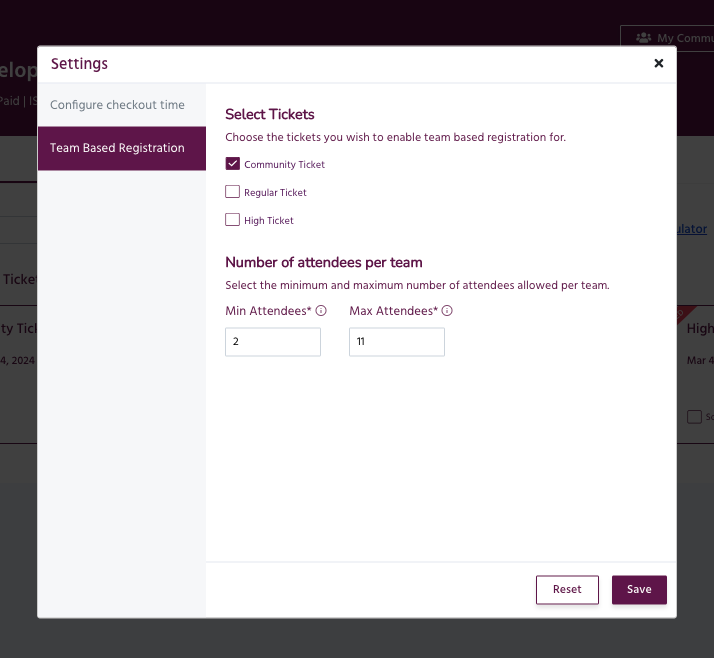
Step 4: Once this option is activated, you will see three options. On the registration page or event page you can either create a team, Join a team or you can purchase a ticket as an individual without opting for TBR.

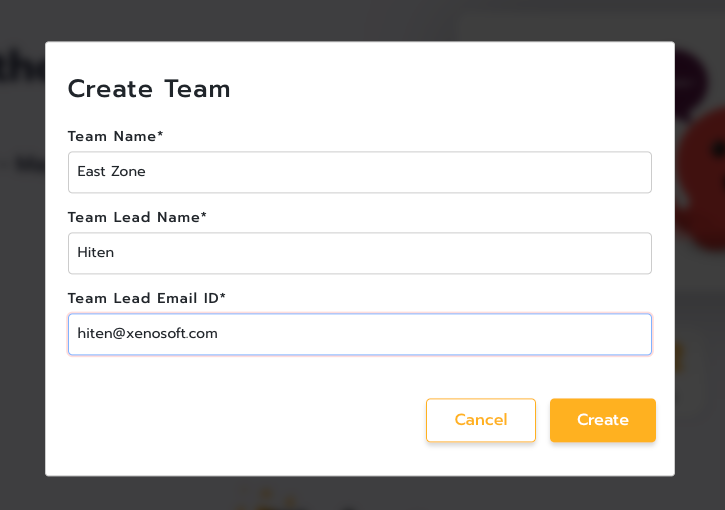
Scenario1: Creating a Team
Hiten, a team lead at Xenosoft Corporation's Kolkata office, decides to participate in the company's hackathon. He wants to organize his team, so he utilizes the team-based registration feature on KonfHub. Here's how it works:
Hiten logs into KonfHub and navigates to the hackathon event page.
He selects the "Create Team" option and provides the necessary details such as team name ("Team Wizards"), team description, and any specific requirements or preferences.
After filling out the details, Hiten clicks on the checkout button to finalize the creation of the team.
Once completed, a new team named "Team Wizards" is successfully created, and Hiten becomes the team lead.
Hiten can now proceed to register himself and any other team members.
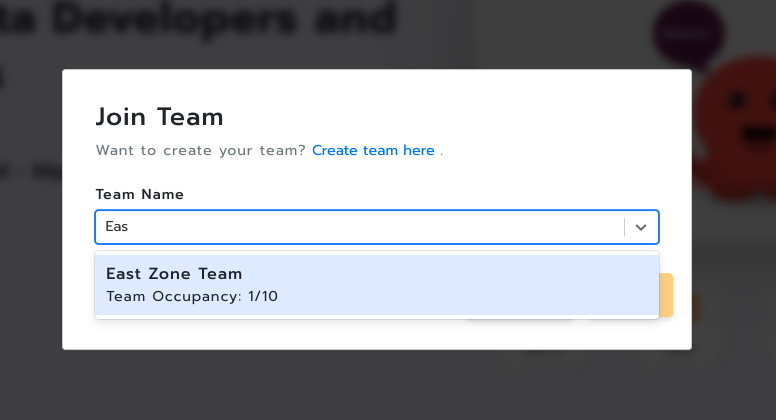
Scenario 2, Joining a Team
Shivani, a colleague of Hiten from Hitesh's office, is eager to participate in the hackathon and wants to join Hiten's team. Here's how she does it:
Shivani logs into her KonfHub account and navigates to the hackathon event page.
She selects the "Join Team" option and browses through the list of available teams.
Shivani finds the "Team Wizards" created by Hiten and selects it.
After confirming her decision, Shivani registers herself as a member of "Team Wizards."
KonfHub automatically associates Shivani with Hiten's team, allowing them to collaborate and participate together in the hackathon.
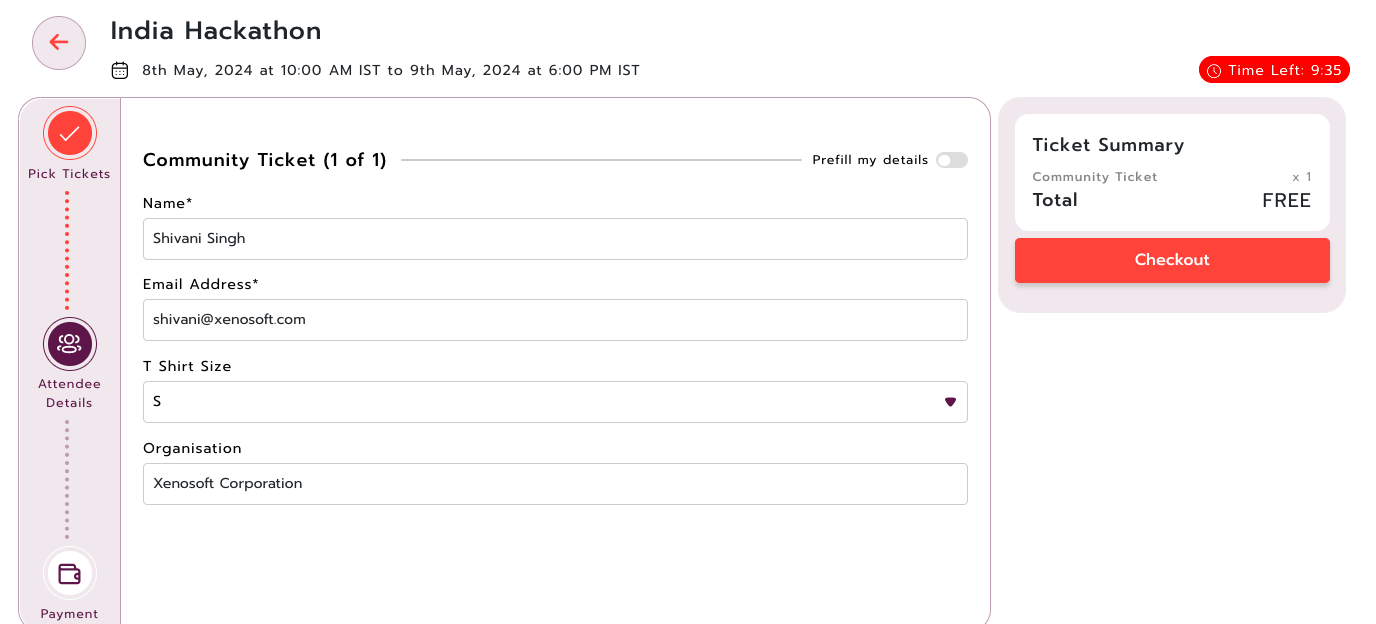
On completing the registration, Shivani will get her tickets via email and Hiten will be notified that Shivani has joined their team via email.
Managing registrations for team events shouldn't involve spreadsheets, manual coordination, or endless email exchanges. With team-based event registration, organizers can simplify the registration process while giving participants a seamless way to create or join teams.
Whether you're hosting hackathons, coding competitions, sports tournaments, debates, college festivals, or corporate events, KonfHub's Team-Based Registration feature helps reduce administrative work, improves the attendee experience, and keeps every team organized from registration to event day.
If your next event involves group participation, enable Team-Based Registration in KonfHub and provide your attendees with a faster, smarter, and more collaborative registration experience.
FAQs
What is team-based event registration?
Team-based event registration allows multiple participants to register as a single team instead of signing up individually. It's commonly used for hackathons, competitions, sports events, and corporate team activities.
Which events are best suited for team-based registration?
Team-based registration is ideal for hackathons, coding competitions, debate tournaments, sports events, college festivals, business challenges, innovation contests, and corporate team-building events.
Can participants join an existing team after registration starts?
Yes. KonfHub allows attendees to browse available teams and join an existing team during the registration process, provided the team has not reached its maximum member limit.
Can organizers set minimum and maximum team sizes?
Yes. Organizers can define the minimum and maximum number of participants allowed in each team when configuring team-based event registration, ensuring every team meets the event requirements.
Can attendees register individually instead of joining a team?
Yes. If organizers allow it, attendees can choose to register individually without creating or joining a team, giving participants greater flexibility.
How do organizers enable team-based registration in KonfHub?
Organizers can enable Team-Based Registration from the Tickets & Forms settings in the event dashboard, select eligible ticket types, and configure team size limits before publishing the event.
What are the benefits of team-based event registration?
Team-based event registration simplifies group sign-ups, reduces manual coordination, improves participant management, streamlines communication, and creates a better registration experience for both organizers and attendees.
Why should organizers use KonfHub for team-based event registration?
KonfHub offers an easy-to-use team-based event registration system that lets attendees create or join teams, while organizers can manage team sizes, registrations, ticketing, attendee communication, and event operations from a single platform.
Bonus Read: 10 Best Event Ticketing Software for Easy Event Management
About the author
KonfHub is an AI-powered, GDPR-compliant platform for seamless ticketing, secure attendee management, and smooth event operations. Say goodbye to complexity and hello to seamless, powerful event management!
Comments
Join the discussionNo comments yet. Be the first to comment.